Paycor Mobile
- 3.8
- Rating
- 1.00M
- Installs
- Free
- Price

 Analysis by App-foxy
Paycor Mobile is the kind of business app that only makes sense when your employer already uses Paycor. I approached it less like a general productivity tool and more like a personal doorway into workplace information: useful when I need to check something related to my job, but not especially meaningful as a standalone download. That distinction is important because the app is designed specifically for employees of Paycor’s clients, not for anyone looking for a universal payroll or scheduling solution.
In my experience, its main value is convenience. Instead of waiting until I am at a computer or asking a manager to look something up, I can use a phone as the practical access point for employee-related tasks made available through my workplace. The result is a focused business app for employee self-service, with the quality of the experience depending heavily on how an employer has configured and uses Paycor.
Why mobile access matters for Paycor employees
The capability I found most important is not a flashy feature but the ability to reach workplace information away from a desk. That changes the timing of ordinary tasks. A question that might otherwise wait until a shift ends, an office opens, or a laptop is available can be handled from the phone when the information is needed.
You May Also Like

 Blood Strike: 2.5 Anniversary
Blood Strike’s Loadouts Turn Every Drop Into a Tactical Gamble
A close look at Blood Strike’s custom loadouts: how fast access to signature weapons reshapes its battle royale rhythm, rewards preparation, and narrows the gap between fights.

 Pandora - Music & Podcasts
Pandora’s Music Is Easy to Start, but Harder to Recover
Pandora’s strength is its low-effort path from a seed to a station. Its weak spot is how much confidence it asks you to place in connection, setup, and quiet recovery.

 8 Ball Pool
 Is Built on Rivalries, Rematches, and Routine
A close look at the rivalries, rematches, shared routines, and unanswered safety questions that turn a quick pool match into a persistent mobile community.

 Samsung Music
’s Quiet Strength Is Playing What You Already Own
Its reach comes less from spectacle than from dependable access to a personal library. That simplicity is both the app’s strongest retention engine and its ceiling.

 AccuWeather: Weather Radar
AccuWeather Review: A Quick, Clear Forecast for Everyday Decisions
For everyday plans, the best forecast is the one you can understand quickly. AccuWeather makes rain timing, radar, and local conditions easy to act on, with a few trade-offs.

 Hill Climb Racing
Why Hill Climb Racing Still Turns Crashes Into One More Run
A tiny car, a bumpy hill and one more upgrade: Hill Climb Racing keeps resurfacing because its simple chaos makes every near-miss feel personal.
More From Our News Desk



That is particularly helpful for employees who work away from a traditional office. Someone moving between locations, working a variable schedule, or rarely sitting at a desktop can benefit more from this format than an office worker who already has easy access to an employer portal. The app turns employee access into something that fits around the workday instead of requiring the workday to stop for it.
I would not describe Paycor Mobile as a replacement for every conversation with a supervisor or payroll team. It is better understood as a convenient front end for the employee services an organization has enabled. If a question involves an exception, a correction, or a policy interpretation, the app cannot replace a human decision-maker. Its strength is giving me direct access to routine information and actions rather than resolving unusual cases.
That makes the app’s audience unusually specific. The developer is Paycor, Inc., and the app is free to download, but free installation does not mean universal access. An employee still needs to belong to an organization that uses Paycor and provides the appropriate account access. I would check that point before installing it, especially if I expected a general payroll tool that could be used independently.
What the phone changes in everyday use
The practical benefit becomes clearer in small moments. Imagine finishing work and realizing that you need to check an employee detail before making plans for the next day. With a mobile employee portal, I can try to find the answer immediately rather than carrying the question around. The same applies when I am away from my usual workstation and need to review information connected to my employment.
This is not about saving a dramatic amount of time on every visit. Many employee tasks are brief already. The improvement comes from removing little obstacles: finding a computer, remembering a password for a separate site, or postponing a check until someone else is available. For people who use the app regularly, those small reductions in friction can matter more than a long list of advanced tools.
There is also a useful separation between personal access and shared workplace equipment. Looking at employment information on my own phone can feel more direct than using a communal computer. I still need to be sensible about device security, of course, but the mobile format is naturally suited to personal, on-demand access.
How I would approach the first setup
I would begin by confirming that my employer supports Paycor Mobile and that I have the correct sign-in details. This is the first practical checkpoint, because a polished app cannot help if the organization has not enabled the relevant employee access. I would also make sure I know which workplace questions the app is intended to answer and which ones still belong with a manager or payroll contact.
After signing in, I would spend a few minutes identifying the areas I expect to use most often rather than tapping through everything without a purpose. That habit makes a difference with employee apps. The goal is not to explore for entertainment; it is to make future visits predictable. If I know where to look for the information my employer has made available, the phone becomes a useful shortcut instead of another system to learn.
I would also treat notifications and account security as part of the setup decision. Employment information is personal, so I would avoid exposing sensitive details on a lock screen and would use the phone’s normal security protections. These are not reasons to avoid the app, but they are sensible trade-offs whenever a work account is placed on a personal device.
A realistic scenario where it earns its place
Consider an employee with a changing schedule who does not spend much time at a desk. Before arranging a personal appointment or making plans around work, that person may want to check the information available through the employer’s Paycor setup. Opening the mobile app at the moment the question comes up is more practical than waiting for access to a desktop portal.
The important detail is that the app helps with timing, not just access. The employee can check information during a commute break, at home, or between work locations, provided it is appropriate and safe to do so. That flexibility is the central reason I would recommend it to a Paycor employee who regularly works away from an office.
There is a second, less obvious use: reducing unnecessary back-and-forth. If I can find a routine answer myself, I do not need to send a message to a manager for something already available through the employee account. That leaves managers more time for questions that genuinely require judgment. The app is therefore most valuable when it is used as the first stop for ordinary employee information, not as a substitute for every workplace channel.
Where the experience depends on the employer
One of the biggest trade-offs is that Paycor Mobile is not a single identical experience for every person. The employer’s Paycor services, configuration, and internal processes shape what I can actually do after signing in. Two employees at different organizations may therefore have different reasons to use the same app.
This dependence can be confusing if I expect every visible area or workflow to apply to me. A missing option is not necessarily an app failure; it may reflect how the employer has arranged its employee services. At the same time, that flexibility means I should not assume that installing the app guarantees access to a particular workplace function. The relevant question is always what my employer has enabled.
That is also why I would avoid judging the app solely by the number of screens or settings it presents. For me, a simpler experience with the information I actually need is better than a crowded interface full of options that do not apply to my job. The app’s usefulness is measured by whether it shortens my route to the right employee task.
Friction I would keep in mind
The app is not ideal for someone who wants a payroll product without an employer connection. Its audience is limited by design, and that is the first reason some readers should skip it. If I am self-employed, managing a small business independently, or comparing general payroll platforms, I would look at tools built for those purposes instead.
I would also be cautious about expecting the phone to explain workplace policy. An employee portal can present information, but it cannot always clarify why something appears a certain way or decide whether a correction is justified. When the issue is unusual, I would use the app to gather the relevant details and then contact the appropriate person rather than repeatedly searching inside it.
Another trade-off is the balance between convenience and account responsibility. A personal phone is always nearby, which is helpful, but that also makes good device habits important. I would use a screen lock, avoid leaving the account open on a shared device, and be careful when checking private employment information in public. The app makes access easier; it does not remove the need for discretion.
People with older compatible devices may also want to check their operating system before planning around the app. Paycor Mobile supports Android devices from version 6.0 onward, so compatibility is broad, but it is still worth checking the phone rather than assuming every device will behave identically. On a supported phone, the current version is 6.1.6, which is the version I would look for when troubleshooting an outdated installation.
How it compares with the usual alternatives
The closest alternative is usually an employer’s browser-based employee portal. A browser can be perfectly adequate on a laptop, especially when I need to review several pieces of information at once or work through a longer administrative task. I would prefer that route when I am already at a computer and want a larger screen.
The mobile app makes more sense when the need is brief and immediate. It is easier to reach from a phone than to open a laptop for a quick check. That is the trade-off in simple terms: the browser may feel better for extended work, while the app is more convenient for short, repeated access during ordinary life.
It also differs from contacting a manager or payroll department directly. A person can answer questions that require context, but direct contact takes time and may not be available immediately. Paycor Mobile is the better first step when the answer is already part of the employee information made available by the organization. It is the worse choice when I need interpretation, a correction, or an exception handled by someone with authority.
I would not compare it too closely with broad personal finance apps either. Those tools may help track money across accounts, but they are not designed around an employer’s employee services. Paycor Mobile has a narrower purpose, and that narrowness is a strength when it matches my situation.
Who gets the most value from it
I think the strongest match is an employee of a Paycor client who wants a convenient way to handle routine work-related access from a phone. The benefit is especially clear for people who work across locations, do not use a desk regularly, or prefer to check employment information independently before asking for help.
It can also suit employees who already know exactly what they need from their workplace account. The more often I have a small, repeatable task, the more useful mobile access becomes. In that situation, the app’s value comes from habit: open it, find the relevant area, check the information, and move on without creating another message or appointment.
I would be less enthusiastic for someone who rarely needs employee self-service or whose employer handles everything through a local office. If I only need to ask an occasional question and a trusted contact answers quickly, installing another app may not improve my routine. Likewise, people looking for a tool to run payroll, hire staff, or manage a business should choose a product aimed at administrators rather than an employee-facing app.
The public response suggests that many people do find the app useful, with an average rating of 3.9 from around 33 thousand ratings. Its reach is also substantial, at over one million installs, while the age classification is Everyone. I see those figures as signs that it is an established employee tool, not proof that every organization or workflow will feel equally smooth.
My recommendation after using it
I would recommend Paycor Mobile to a friend only after asking one question: does their employer actively use Paycor for the employee services they need? If the answer is yes, the app can be a worthwhile convenience, particularly for quick access away from a desk. If the answer is no, downloading it is unlikely to solve anything.
My overall view is positive but deliberately practical. This is not an app I would install for its own sake, and it does not replace human support for complicated workplace matters. Its real strength is more modest and more useful: it puts an employer-connected employee portal within reach when a computer or office contact is inconvenient.
The best reason to keep it installed is the time it saves in small, recurring moments. When the employer setup matches my needs, that convenience feels natural. When it does not, the app cannot create access that the organization has not provided. That makes Paycor Mobile a focused recommendation for participating employees, rather than a general business download for everyone.
Paycor, Inc. has positioned the app for that specific role, and I think the focused approach is appropriate. I would use it as a quick employee access point, keep expectations aligned with what my workplace supports, and switch to a browser or a human contact whenever the task becomes more involved.
FAQs for Paycor Mobile
01What features does Paycor Mobile offer?
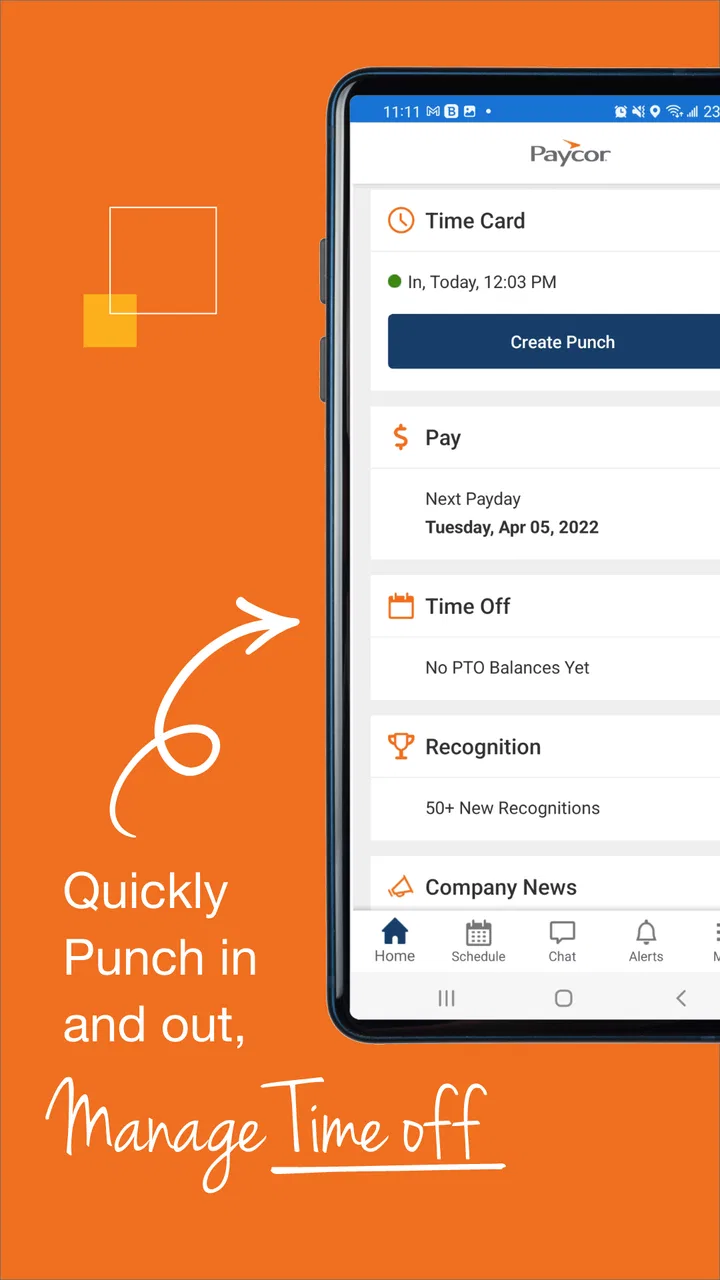
Paycor Mobile provides a range of features designed to streamline HR and payroll processes. Users can access pay stubs, manage time cards, view schedules, and request time off directly from the app. Additionally, managers can approve requests and track employee performance, making it a comprehensive tool for both employees and HR professionals.
02Is Paycor Mobile secure for handling sensitive information?
Yes, Paycor Mobile is equipped with robust security measures to protect user data. The app employs encryption and secure login protocols to ensure that sensitive information such as payroll details and personal data remains confidential and accessible only to authorized users. Regular updates further enhance its security framework.
03Can Paycor Mobile integrate with other systems or apps?
Paycor Mobile is designed to seamlessly integrate with various HR, payroll, and accounting systems. This compatibility allows businesses to synchronize data across platforms, reducing the need for manual entry and minimizing errors. Integration capabilities can vary, so it's recommended to consult with Paycor support for specific needs.
04How user-friendly is Paycor Mobile for employees and managers?
Paycor Mobile is designed with user experience in mind, offering a clean and intuitive interface. Employees can easily navigate through their payroll, benefits, and scheduling options, while managers have access to tools for managing teams efficiently. The app’s design ensures that even those with limited tech skills can use it effectively.
05What should I do if I encounter issues with Paycor Mobile?
If you experience any issues with Paycor Mobile, there are several ways to seek assistance. The app provides a support section with FAQs and troubleshooting tips. Users can also contact customer service directly through the app or via the Paycor website for personalized help. Regular updates aim to resolve any existing bugs.
Pros
- User-friendly interface and navigation.
- Comprehensive payroll management features.
- Efficient employee self-service options.
- Seamless integration with HR systems.
- Timely updates and notifications.
Cons
- Limited customization options.
- Occasional login issues reported.
- Some features require premium access.
- Limited offline functionality.
- Customer support can be slow.

Paycor Mobile
Gallery